 right, i most certainly am off to bed
have some fluff capable of knocking buildings over.
goodnight.
(goodnight.
 AgentMuu hentai coordination,
Wed 18 May 2005, 4:55,
archived)
Aww! Dirty paws!
AgentMuu hentai coordination,
Wed 18 May 2005, 4:55,
archived)
Aww! Dirty paws!'nite!
( Syncubus Yarr! Ye'll be walking Planck's Constant! [GMT-5],
Wed 18 May 2005, 4:58,
archived)
Increase the fluff ratio sufficiently and most fluff is capable of this I suspect
Syncubus Yarr! Ye'll be walking Planck's Constant! [GMT-5],
Wed 18 May 2005, 4:58,
archived)
Increase the fluff ratio sufficiently and most fluff is capable of this I suspectNight!
( Jessie © needs pirate name suggestions,
Wed 18 May 2005, 4:58,
archived)
Jessie © needs pirate name suggestions,
Wed 18 May 2005, 4:58,
archived)
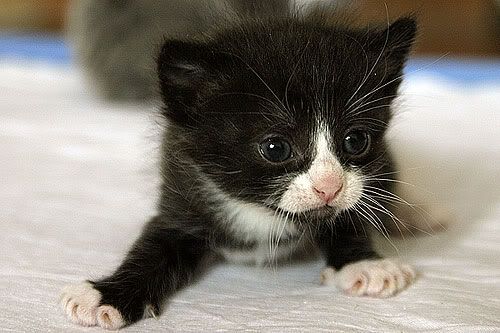
 In matlab, like so. It uses the Difference of Gausian pattern (or "mexican hat filter") to find thin lines in the image
im = imread('kitten7.jpg'); % must be 8 bit greyscale image
c = -1/8;
f = [c, c, c; c, 1, c; c, c, c];
[i,j] = size(f);
i = (i-1)/2;
j = (j-1)/2;
im = [im(1,:);im(:,:);im(end,:)];
im = [im(:,1),im(:,:),im(:,end)];
[maxN, maxM] = size(im);
out = zeros(maxN-1,maxM-1);
for n=2:(maxN-1)
for m=2:(maxM-1)
s = im((n-i):(n+i),(m-j):(m+j));
out(n-1,m-1) = sum(sum(double(s).*f));
end
end
z = 60; % adjust this value for each image till only wiskers remain
for n=2:(maxN-1)
for m=2:(maxM-1)
if out(n-1,m-1)
I could write a second step that removed things that aren't really wiskers from the output (using Hough Transforms to remove things that don't have wisker-like shapes)
